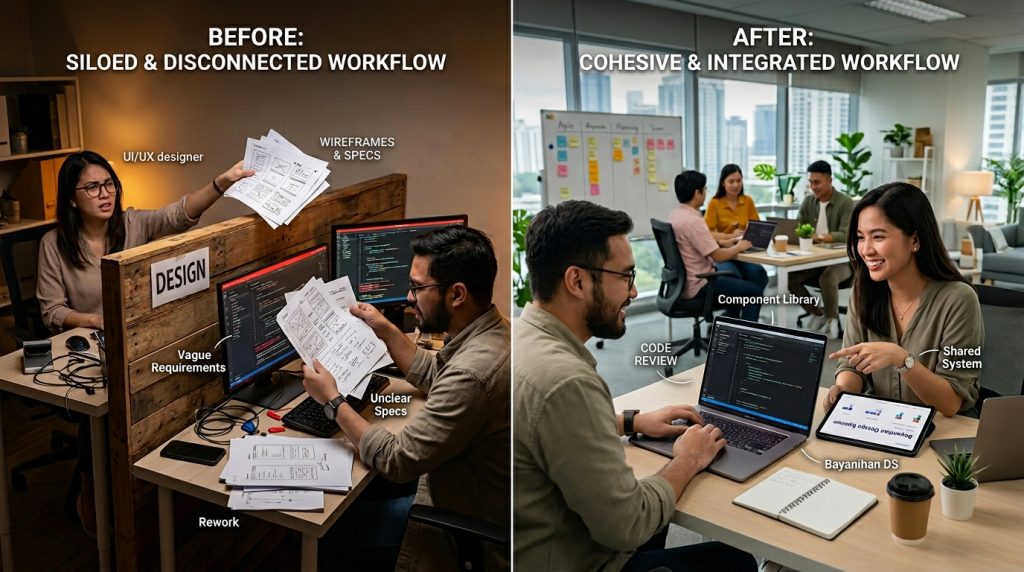
A strong design development workflow is the backbone of any successful digital product. While many teams focus on tools or talent, the real difference often lies in how well design and development align. When these two functions work in sync, projects move faster, errors decrease, and the final product feels polished.
However, when the process breaks down, even great ideas can fail. Designers may create beautiful interfaces that are hard to build. Developers may deliver functional features that miss the intended user experience. Because of this gap, teams often waste time fixing avoidable issues.
That’s why building a cohesive design development workflow is not just helpful. It’s essential for consistent, scalable product delivery.
Why alignment between design and development matters
At its core, alignment ensures that everyone works toward the same outcome. Designers focus on usability and aesthetics, while developers focus on functionality and performance. When both sides collaborate early, decisions become clearer and more efficient.
For example, a designer might propose a complex animation. If developers are involved early, they can suggest simpler alternatives that still achieve the desired effect. As a result, the team saves time without sacrificing quality.
In addition, alignment reduces rework. Instead of redesigning features after development begins, teams can validate ideas upfront. This improves timelines and reduces frustration.
A well-structured design development workflow creates this alignment naturally. It builds communication into every stage, ensuring nothing gets lost between handoffs.
The foundation of a cohesive process
Before tools or frameworks, you need a clear structure. A good design development workflow starts with defined stages that everyone understands.
First comes discovery. During this phase, teams gather requirements, define goals, and understand user needs. Both designers and developers should participate. This ensures that technical and design constraints are considered early.
Next is design exploration. Designers create wireframes, mockups, and prototypes. At the same time, developers review feasibility. This prevents unrealistic designs from moving forward.
Then comes validation. Teams test ideas with users or stakeholders. Feedback helps refine the solution before development begins.
Finally, development and iteration bring the product to life. Continuous feedback loops ensure the design remains intact during implementation.
Because each stage connects clearly, the design development workflow stays smooth and predictable.
Creating shared language and systems
One of the biggest challenges in cross-functional teams is communication. Designers and developers often use different terminology, which can lead to misunderstandings.
To solve this, teams need a shared language. Design systems play a key role here. They define components, styles, and interactions in a consistent way.
For example, instead of describing a button differently each time, teams refer to a defined component. This removes ambiguity and speeds up development.
In addition, documentation helps bridge gaps. Clear guidelines, specifications, and examples ensure everyone understands how elements should behave.
A mature design development workflow relies heavily on these shared systems. They reduce guesswork and improve efficiency across the board.
Tools that support collaboration
While process matters most, tools can enhance collaboration when used correctly. The goal is not to add complexity but to simplify communication.
Design tools like Figma allow real-time collaboration. Designers and developers can review designs together, leave comments, and make adjustments quickly.
Project management tools help track progress. They ensure tasks move smoothly from design to development without confusion.
Version control systems also play a crucial role. They allow developers to manage changes without disrupting the workflow.
However, tools alone are not enough. Without a clear design development workflow, even the best tools can create chaos. Therefore, tools should support the process, not replace it.
Reducing friction during handoff
Handoff is where many projects fail. Designers complete their work, then pass it to developers. If the transition is unclear, errors and delays follow.
To improve this, teams should treat handoff as a collaboration, not a transfer. Designers should provide detailed specifications, including spacing, typography, and behavior.
At the same time, developers should ask questions early. Instead of guessing, they clarify uncertainties before coding begins.
Interactive prototypes also help. They show how elements behave, reducing the need for long explanations.
A strong design development workflow minimizes friction by making handoff a shared responsibility rather than a one-sided process.
Building feedback loops into the process
Feedback is essential for improvement. However, many teams wait until the end of development to review work. By then, changes are costly.
Instead, feedback should happen continuously. Designers review early builds, while developers provide input during design stages.
Short feedback cycles keep projects on track. They allow teams to catch issues early and adjust quickly.
User testing also plays a role. Real feedback from users helps validate decisions and improve the product.
Because of these loops, a well-designed design development workflow remains flexible. It adapts to changes without disrupting progress.
Balancing speed and quality
Speed is important in product development. However, rushing can lead to mistakes and inconsistencies.
A good design development workflow balances speed with quality. It ensures that teams move efficiently without cutting corners.
For example, reusable components save time. Instead of building everything from scratch, teams use existing elements.
At the same time, quality checks maintain standards. Regular reviews ensure that designs are implemented correctly.
By combining efficiency with attention to detail, teams can deliver faster without sacrificing user experience.
Scaling your workflow as teams grow
As teams expand, processes become more complex. What works for a small team may not work for a larger one.
Scaling requires structure. Clear roles, responsibilities, and guidelines help maintain consistency.
Design systems become even more important. They ensure that new team members follow the same standards.
In addition, communication channels must be well-defined. Teams need to know where to share updates, ask questions, and provide feedback.
A scalable design development workflow grows with the team. It maintains clarity even as complexity increases.
Common pitfalls to avoid
Even with the best intentions, teams can fall into common traps. Recognizing these early can prevent long-term issues.
One mistake is overcomplicating the process. Too many steps can slow teams down. Simplicity often leads to better results.
Another issue is lack of documentation. Without clear guidelines, teams rely on assumptions, which leads to inconsistencies.
In addition, poor communication can break the workflow. Regular check-ins and updates help keep everyone aligned.
Finally, ignoring feedback can limit improvement. Teams that listen and adapt tend to perform better over time.
Avoiding these pitfalls strengthens your design development workflow and keeps projects on track.
Conclusion: building a workflow that works
A cohesive design development workflow is more than a process. It’s a system that connects people, tools, and ideas into a seamless experience.
When design and development align, teams work more efficiently. They reduce errors, improve quality, and deliver better products.
However, building this alignment takes effort. It requires clear communication, shared systems, and continuous improvement.
The good news is that small changes can make a big difference. By refining your workflow step by step, you create a foundation for long-term success.
Ultimately, the goal is simple. Create a process where design and development support each other, not compete. When that happens, great products become the natural outcome.
FAQ
1. What is the main goal of aligning design and development?
The goal is to ensure that design ideas are implemented accurately while maintaining usability and performance.
2. Which tools help improve collaboration between teams?
Tools like Figma, Jira, and Git support communication, task management, and version control effectively.
3. How can teams reduce errors during handoff?
Clear documentation, detailed specifications, and early communication help reduce misunderstandings.
4. Why are design systems important in product workflows?
They create consistency, improve efficiency, and provide a shared reference for both designers and developers.
5. How can a workflow adapt as teams grow?
By defining roles, improving communication, and maintaining strong systems, workflows can scale effectively.